

In our daily lives, we're accustomed to seeing vibrant, detailed images. However, there's a hidden secret: camera sensors are inherently color-blind. Each pixel can only detect brightness, not color. Converting this black-and-white data into a color image requires a complex system. At the heart of this system lies the Bayer pattern (Bayer filter) and the image signal processor (ISP). These two elements act like the camera's brain and eyes, working together to shape the process from raw light signals to the final image.
As a consultant specializing in camera modules, this article will provide an in-depth analysis of the Bayer pattern, unveil the ISP processing flow, and explore how these core technologies directly impact applications like object detection in embedded vision systems. We'll provide expert insights from an engineer's perspective, helping you understand each key link in the image chain.
What is Bayer?
To understand the Bayer pattern, you first need to understand how digital cameras work. A camera sensor is composed of millions of photosensitive diodes (pixels). When photons strike these pixels, they generate an electrical charge whose magnitude is proportional to the light intensity. However, these pixels cannot distinguish between colors of light; they only record its brightness.
The Bayer pattern, often called a Bayer filter, is a novel solution. It consists of a tiny array of filters-red (R), green (G), and blue (B)-precisely placed over each pixel. This filter array allows each pixel to receive and record only the intensity of the specific color of light beneath it. For example, a pixel covered by a red filter only records the brightness of red light.

Thus, the raw data output by the sensor is not a color RGB image, but a monochrome mosaic pattern, known as "Bayer Raw Data." Each pixel in this data contains information from only one color channel.
Why Green is Twice in the Bayer Pattern
If you look closely at a typical Bayer pattern, you'll notice that there are twice as many green pixels as red and blue pixels. This is known as an RGGB (or GRBG, BGGR, etc.) arrangement.
This design is no accident; it's based on the physiological properties of the human eye. The human retina is most sensitive to green light, causing our perception of brightness (or "grayscale") to primarily come from the green channel. By allocating more pixels to green, the camera is able to capture richer brightness information, resulting in higher clarity and less noise when reconstructing the image, ultimately making the image appear more natural and sharper.
GGB vs. BGGR Difference
There are various Bayer pattern arrangements, with RGGB and BGGR being the two most common. While both follow the "double green" principle, the specific arrangement differs.
In the RGGB arrangement, red and blue pixels are placed diagonally across from green pixels. In the BGGR arrangement, green pixels are placed diagonally across from red and blue pixels. The choice of these arrangements affects the subsequent ISP processing, particularly the demosaicing algorithm.
For example, different arrangements affect the combination of adjacent pixels during interpolation calculations. For embedded vision systems, the choice of Bayer pattern often depends on the ISP chip design and requires hardware and software coordination to ensure final image quality.
What is an ISP (Image Signal Processor)?
The image signal processor (ISP) is the brains of the camera system. Its primary task is to receive unprocessed Bayer raw data from the sensor and, through a complex processing pipeline, convert it into a standard image format that we see, ready for display or analysis. An ISP can be a standalone chip or integrated into the main control chip.
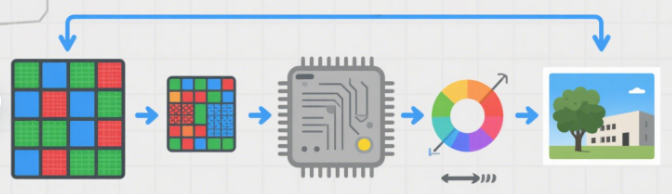
An efficient ISP is key to a high-performance camera module. Every step it handles is crucial and directly determines the final image quality.
ISP Processing Pipeline
A complete ISP pipeline typically includes dozens of processing steps. We will highlight several key steps here:
1. Bad Pixel Correction
During the manufacturing process, sensors may develop individual bad pixels, which are either non-luminous or permanently luminous. The first step of the ISP is to identify and repair these bad pixels, replacing their data by interpolating from surrounding pixels.
2. Black Level Correction
Even in complete darkness, the sensor still produces a weak electrical signal due to "dark current." The ISP subtracts this fixed "black level" to ensure that black pixels are truly zero, thereby improving the image's dynamic range.
3. Denoising
When the sensor is in low light, it generates a large amount of random electronic noise. The ISP uses complex algorithms to distinguish image detail from noise and then applies noise reduction. This can significantly improve image purity, but excessive noise reduction can also erase detail.
4. Demosaicing
This is one of the core functions of the ISP. The demosaicing algorithm interpolates the information of each pixel's neighboring red, green, and blue pixels to infer the complete RGB value of that pixel. The quality of the demosaicing algorithm directly determines the color reproduction and detail of the final image.
5. Auto White Balance
Different light sources (such as sunlight, fluorescent lighting, and incandescent lighting) emit light with different color temperatures. The auto white balance function analyzes the color distribution in the image and automatically adjusts the gain of the red, green, and blue channels to ensure that white objects are accurately rendered white under any lighting source. This dynamic and complex process is one of the core selling points of the ISP.

6. Color Correction (CCM)
Even after white balancing, a camera's color reproduction may not be accurate. The ISP uses a color matrix to further correct color, mapping the camera sensor's native color space to a standard color space (such as sRGB) to ensure color consistency across different devices.
7. Gamma Correction
Gamma correction is a nonlinear process for image brightness to match the human eye's nonlinear visual perception, making bright and dark areas appear more natural and richer in depth.
8. Sharpening and Edge Enhancement
The ISP enhances edges in images, making them appear clearer and sharper. However, this requires precise control, as over-sharpening can introduce unnatural jagged artifacts.
The Impact of an ISP on Computer Vision
For embedded vision engineers, an ISP is more than just a tool for image beautification. Every processing step in the ISP directly impacts the performance of downstream computer vision algorithms. Ignoring the ISP's role can lead to fatal flaws in applications like object detection.
The "Black Box" Effect of the ISP
Many engineers mistakenly view the ISP as a "black box," assuming it's solely responsible for producing a "good-looking" image. However, while some ISP processing can enhance visual quality, it can also interfere with computer vision algorithms.
For example, overly aggressive ISP noise reduction can smooth out subtle textures and details in the image, which are crucial for object detection algorithms.
The Challenge of Auto White Balance
Unstable auto white balance is a major pain point in computer vision. Under changing lighting conditions, if auto white balance fails to accurately adjust color temperature, it can cause a color cast in the image. This can render trained object detection models ineffective in real-world applications, as they may be unable to detect objects with the cast.
How to Address This
To ensure the robustness of computer vision algorithms, engineers need an ISP optimized for vision applications. This means that the ISP's parameters must be controllable and adjustable, allowing engineers to fine-tune the image processing pipeline for specific application scenarios (such as bright outdoor light or low-light conditions at night). Additionally, it's crucial to select a camera module that outputs raw Bayer data. This allows engineers to perform ISP processing in backend software, providing maximum flexibility and control.
Summary
The Bayer pattern and image signal processor are the cornerstones of the digital imaging chain, working together to transform raw light signals into useful image information. Understanding each processing step of the ISP and recognizing its direct impact on downstream computer vision algorithms is essential for every embedded vision engineer. The ISP not only contributes to the aesthetics of images but also determines the success of AI applications such as object detection and image recognition.
Muchvision Helps with ISP Optimization
Are you struggling with camera module ISP optimization for your project? Contact our expert team today and we'll provide you with professional image signal processor selection and customization services to help your embedded vision project succeed!


